SoilWise Geopackage
Observation Form
Open
To open the Observation custom forms, go to the Layers panel, right‑click the observation layer, and choose Open Attribute Table from the context menu.
Tip
For further information on the custom forms, consult the documents Customized Attribute Forms in QGIS and Navigating GeoPackage Tables via Forms
Important
It is strongly recommended to create Observations through the child forms of the Datastream rather than directly from the Observation table, as this ensures that the Observation automatically receives the correct parent keys without manual selection.
Edit
A Observation does not contain any geometry. To enable editing through forms, follow the instructions provided in the document Editing Records Through a QGIS Form.
REQUIRED fields
id: primary key (auto-incrementing)phenomenontime_start: DATETIME (default: today)guid_datastream: TEXT (FK)
ID Group

Fields
-
id- Primary AUTO_INCREMENT INTEGER PRIMARY KEY; it’s the required identifier for GeoPackage tables and is assigned automatically on insert. -
guid- Global identifier in UUID format, stored as text. The field is optional. It’s automatically managed via triggers.
Important
On opening, the ID group is collapsed: there is no need for manual editing, as both fields are system‑managed (the id by the SQLite engine and the guid by triggers), reducing errors and ensuring identifier consistency over time.
Value
The custom form displays only the appropriate Value control based on the selection made in the parent Datastream.
This ensures users can enter a value that matches the Datastream’s configured Result Type and related constraints.
UI-Level Behavior (Custom Form)
- The form is type-aware: it shows only the correct Value input according to the parent Datastream’s configuration.
- Incompatible inputs are hidden or disabled, preventing invalid entries at the source.
Important
The same validation is enforced by the database engine.
Only values of the correct type—as defined in the parent Datastream—can be persisted.
This guarantees integrity even if records are inserted or modified outside the form (e.g., direct table edits or batch operations).
Result Type: Boolean
value of type True/False
Represent binary values (true/false).

Result Type: Category
value of type Text
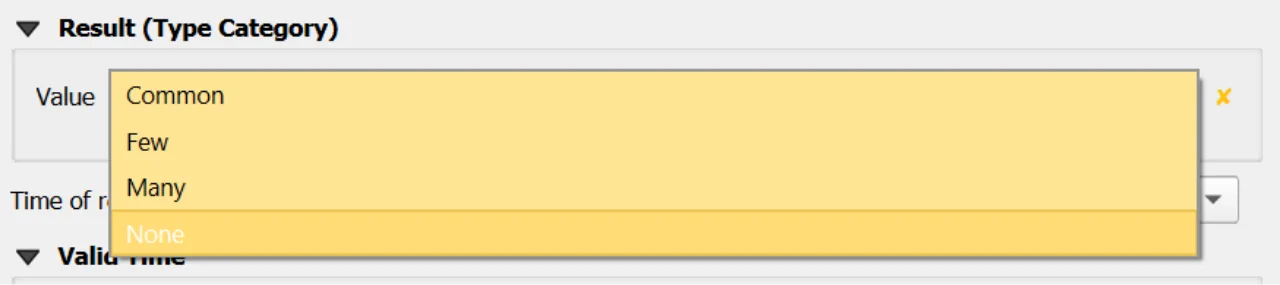
Represent categorical or classified values defined within a controlled code list.
Only codes that are valid for the codespace selected in the Datastream appear in the dropdown list.
Important
For further information about codespaces and instructions on how to add them to the geopackage, please refer to the documentation of the Codelist table.
Result Type: Count
value of type Real
Used to represent integer counts or occurrences.

If range limits are defined in the parent Datastream:
- When both
value_minandvalue_maxare present, the Value must fall within the inclusive range:value_min ≤ value ≤ value_max
- When only one bound is defined, the respective bound is enforced:
- If only
value_minis set →value ≥ value_min - If only
value_maxis set →value ≤ value_max
- If only
If no bounds are specified in the Datastream, any value of the correct type is accepted.
Result Type: Quantity
value of type Real
Used to represent measurable quantities associated with a numeric value and a unit of measure.

If range limits are defined in the parent Datastream:
- When both
value_minandvalue_maxare present, the Value must fall within the inclusive range:value_min ≤ value ≤ value_max
- When only one bound is defined, the respective bound is enforced:
- If only
value_minis set →value ≥ value_min - If only
value_maxis set →value ≤ value_max
- If only
If no bounds are specified in the Datastream, any value of the correct type is accepted.
Important
Only values of the correct type—as defined in the parent Datastream—can be persisted.
This guarantees integrity even if records are inserted or modified outside the form (e.g., direct table edits or batch operations).
Constraints
- Valid time order:
validtime_end > validtime_startwhen both provided (CHECK). - Type-shape enforcement: BEFORE INSERT/UPDATE triggers validate
result_*per parent datastreamtype, including NULLability, boolean domain, integer requirement forCount, and compliance withvalue_min/maxwhere defined. - Category membership: when parent datastream type is
Category,result_textmust exist incodelist(id)for that datastreamcodespace(BEFORE INSERT/UPDATE). - Datastream time window maintenance: AFTER triggers recalculate the parent datastream
phenomenontime_*after INSERT/UPDATE/DELETE.
Attribute Reference
For an overview of the attributes used in the custom form, refer to the Observationsite table documentation. It provides the key definitions and data types needed to correctly interpret the fields and configure the form within the data model.
Save
For a more comprehensive overview of form‑saving workflows, refer to the detailed documentation in Saving Edits in QGIS Forms.