SoilWise Geopackage
Soil Plot
Definition
“Is the location of a specific soil investigation.”[^1] [^1]: European Commission – Joint Research Centre (JRC),
INSPIRE Data Specification on Soil – Technical Guidelines,
D2.8.III.3.
https://inspire-mif.github.io/technical-guidelines/data/so/dataspecification_so.pdf
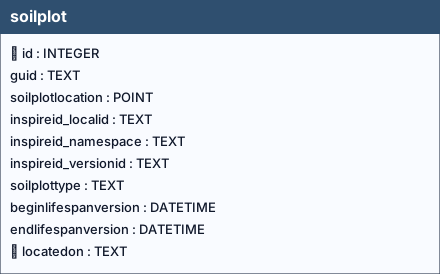
Table: soilplot
Columns
| Name | Type | Constraints | Description |
|---|---|---|---|
id |
INTEGER |
PRIMARY KEY | Primary Key of the Table. |
guid |
TEXT |
||
soilplotlocation |
POINT |
NOT NULL | Geometry. |
inspireid_localid |
TEXT |
||
inspireid_namespace |
TEXT |
||
inspireid_versionid |
TEXT |
||
soilplottype |
TEXT |
NOT NULL | |
beginlifespanversion |
DATETIME |
NOT NULL, DEFAULT strftime(‘%Y-%m-%dT%H:%M:%fZ’, ‘now’) | |
endlifespanversion |
DATETIME |
||
locatedon |
TEXT |
Foreign key to the SoilSite table, guid field. |
Table Identifiers
In this table, the primary key is the id field (integer, auto-incrementing).
There is also a text field named GUID, which stores a UUID (Universally Unique Identifier) compliant with RFC 4122.
Although GUID is not mandatory at the schema level (it is not declared NOT NULL), its functional requirement is enforced by two triggers:
- soilplotguid (INSERT) trigger: if GUID is missing or empty, a correctly formatted UUID is generated and inserted automatically.
- soilplotguidupdate (UPDATE) trigger: prevents any modification of GUID after insertion, making it immutable (effectively behaving as a stable key).
Any foreign keys (FK) from other tables reference this table’s GUID field rather than the id field, ensuring stable and interoperable references across datasets and database instances.
Note
GUID management is handled by database triggers, which ensure their automatic generation at the time of record insertion, without any user involvement.
Coded Fields
The soilplottype field is a coded field (codelist-based attribute), meaning that it can only contain values belonging to a predefined codelist, in accordance with the INSPIRE specifications.
Warning
Any attempt to insert a value that is not included in the corresponding codelist is considered invalid by the system and will result in the failure of the data insertion operation.
Codelist Definition
The complete list of allowed codes is stored in the codelist table.
The associated documentation, provides a detailed description of:
- which codes are available (codelist URL),
- the database tables to which each codelist applies,
- the fields for which each code is valid,
in accordance with the adopted conceptual model.
Validation and Data Entry
The semantic and syntactic validation of the inserted values is enforced at the database level through dedicated control triggers (i_soilplottype/u_soilplottype), ensuring compliance with the defined codelists.
Important
During data entry via the QGIS interface, users are supported by dropdown menus that display only the valid codes for the selected field.
Note
This mechanism reduces the risk of data entry errors and guarantees alignment with the constraints imposed by the INSPIRE codelists.
Relationships (as child)
soilplot.locatedon→soilsite.guid(ON UPDATE CASCADE, ON DELETE NO ACTION)
Referenced by (as parent)
soilprofile.location→soilplot.guid(ON UPDATE CASCADE, ON DELETE CASCADE)
Indexes
| Name | Unique | Columns | Origin | Partial |
|---|---|---|---|---|
idx_soilplot_geom |
No | soilplotlocation |
c |
No |
idx_soilplot_locatedon |
No | locatedon |
c |
No |
Triggers
For every trigger you will find:
- When it runs (BEFORE/AFTER, INSERT/UPDATE/DELETE)
- What it reads and compares (columns, lookups in other tables)
- What happens on success (the statement proceeds, optional updates)
- What happens on failure (the exact error text raised)
soilplotguid
When it runs: AFTER INSERT
What it does: Generates a UUID v4 when NEW.guid is NULL.
If the check passes: Assigns the GUID.
If the check fails: No failure path.
soilplotguidupdate
When it runs: AFTER UPDATE OF guid
What it does: Prevents changing guid by comparing new vs old.
If the check passes: Update proceeds.
If the check fails: Aborts with: Cannot update guid column.
i_ceckvalidversionsoilplot
When it runs: BEFORE INSERT
What it does: Ensures beginlifespanversion < endlifespanversion.
If the check passes: Insert proceeds.
If the check fails: Aborts with: Table soilplot: beginlifespanversion must be less than endlifespanversion.
i_soilplottype / u_soilplottype
When they run: BEFORE INSERT / BEFORE UPDATE
What they do: Validate that soilplottype exists in codelist.id with collection = 'SoilPlotTypeValue'.
If the check passes: Statement proceeds.
If the check fails: Aborts with: Table soilplot: Invalid value for soilplottype. Must be present in id of soilplottypevalue codelist.
u_begin_today_soilplot
When it runs: AFTER UPDATE
What it does: If the plot is still active (future/NULL end), refreshes beginlifespanversion to now.
If the check passes: Timestamp is refreshed.
If the check fails: No failure path.
u_begin_today_soilplot_error
When it runs: AFTER UPDATE
What it does: Blocks edits when endlifespanversion lies in the past.
If the check passes: Update continues.
If the check fails: Aborts with: If you change record endlifespanversion must be greater than today.