SoilWise Geopackage
Thing
Definition
The OGC SensorThings API Standard follows the ITU-T definition with regard to the Internet of Things: A thing is an object of the physical world (physical things) or the information world (virtual things) that is capable of being identified and integrated into communication networks ITU-T-Y.2060. A Thing is related to the Platform entity as described in Section 4.9.2.1 of OGC 16-079 in a way that any entity that can be modelled as a Thing may be subsequently translated to a Platform and vice versa. 1
SensorThings API 2.0 (23-019) (DRAFT),
version 23-019.
https://hylkevds.github.io/23-019/23-019.html
Management of the Thing Table in the GeoPackage
This document describes how the Thing table is automatically managed within the GeoPackage through a set of database triggers based on the soft reference principle.The automation ensures consistent creation, reuse, and maintenance of Thing records when Datastreams are created, while still allowing manual user intervention when needed.
When a Datastream is created without explicitly specifying the guid_thing field, the system automatically determines and associates an appropriate Thing based on the related Feature of Interest (FoI).
The process follows a predefined set of rules to:
- create a new
Thingif it does not exist; - reuse an existing
Thingif one is already available; - maintain consistency across related entities.
Soft Reference Principle
The system applies a soft reference strategy:
- The
Thingtable stores a GUID that mirrors the GUID of the related FoI. - No hard foreign key constraint is enforced.
- Association is achieved by matching GUID values.
This approach allows flexibility while maintaining logical consistency.
Rules for Thing Creation and Association
1. Feature of Interest: Soil Site
When the FoI is a Soil Site:
- The system retrieves the GUID of the reference soil site.
- A row is created in the
Thingtable only if it does not already exist, using:- the same GUID (soft reference);
- the same INSPIRE ID;
- an INSPIRE-compliant description of the soil site.
- If another Datastream refers to the same soil site, the existing
Thingis reused.
2. Feature of Interest: Soil Derived Object
When the FoI is a Soil Derived Object:
- The system uses:
- the GUID of the soil derived object;
- the corresponding INSPIRE ID;
- an appropriate INSPIRE-compliant description.
- The
Thingrow is created if it does not exist; otherwise, it is reused.
3. Feature of Interest: Soil Profile
The system first determines the type of soil profile.
3.1 Derived Soil Profile
- A
Thingrow is created (if not already present) using:- the GUID of the derived soil profile;
- the INSPIRE ID;
- an INSPIRE-compliant description of the derived profile.
3.2 Observed Soil Profile
- The system navigates the hierarchy to identify the parent soil site.
- The corresponding
Thing(identified by the soil site GUID) is:- created if missing;
- reused if already present.
4. Feature of Interest: Profile Element
When the FoI is a Profile Element:
- The system identifies the parent soil profile.
- It determines whether the profile is derived or observed.
- The same rules defined for Soil Profiles are applied to determine or create the associated
Thing.
Important
Fallback Case
If it is not possible to determine an appropriate Thing:
- The system falls back to a predefined
Thingnamed “Soil”. - This fallback
Thing: - has an INSPIRE-compliant description;
- is preloaded into the GeoPackage at publication time.
Manual User Intervention
The automated management does not prevent user control.
Users can:
- manually select a different
Thing; - modify the
Thingassociated with a Datastream; - create new
Thingentries and associate them with Datastreams.
Note
If no manual action is taken, the system fully manages Thing creation and association automatically.
Note
Propagation of Updates Additional triggers ensure consistency when changes occur in the GeoPackage involving:
- soil derived profiles;
- soil sites;
- soil derived objects.
When these entities are updated:
- the corresponding
Thingentries are automatically updated; - alignment with the parent entity is preserved.
Summary
The trigger-based management of the Thing table:
- ensures consistent and automated associations;
- avoids duplication through GUID-based reuse;
- supports INSPIRE compliance;
- allows manual overrides when necessary.
This design balances automation, flexibility, and data integrity within the GeoPackage.
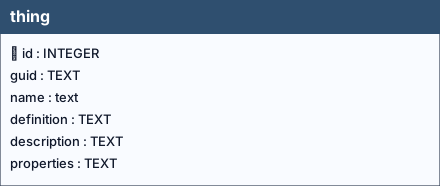
Table: thing
Columns
| Name | Type | Constraints | Description |
|---|---|---|---|
id |
INTEGER |
PRIMARY KEY | A unique, read-only attribute that serves as an identifier for the entity. |
guid |
TEXT |
Universally unique identifier. | |
name |
TEXT |
NOT NULL | A property provides a label for Thing entity, commonly a descriptive name. |
definition |
TEXT |
The URI linking the Thing to an external definition. Dereferencing this URI SHOULD result in a representation of the definition of the Thing. | |
description |
TEXT |
This is a short description of the corresponding Thing entity. | |
properties |
TEXT |
mime type: ‘application/json’. A JSON Object containing user-annotated properties as key-value pairs. |
Table Identifiers
In this table, the primary key is the id field (integer, auto-incrementing).
There is also a text field named GUID, which stores a UUID (Universally Unique Identifier) compliant with RFC 4122.
Although GUID is not mandatory at the schema level (it is not declared NOT NULL), its functional requirement is enforced by two triggers:
- thingguid (INSERT) trigger: if GUID is missing or empty, a correctly formatted UUID is generated and inserted automatically.
- thingguidupdate (UPDATE) trigger: prevents any modification of GUID after insertion, making it immutable (effectively behaving as a stable key).
Any foreign keys (FK) from other tables reference this table’s GUID field rather than the id field, ensuring stable and interoperable references across datasets and database instances.
Note
GUID management is handled by database triggers, which ensure their automatic generation at the time of record insertion, without any user involvement.
Relationships (as child)
- None
Referenced by (as parent)
datastream.guid_thing→thing.guid(ON UPDATE CASCADE, ON DELETE CASCADE)
Indexes
- None
Triggers
For every trigger you will find:
- When it runs (BEFORE/AFTER, INSERT/UPDATE/DELETE)
- What it reads and compares (columns, lookups in other tables)
- What happens on success (the statement proceeds, optional updates)
- What happens on failure (the exact error text raised)
thingguid / thingguidupdate
When they run: AFTER INSERT / AFTER UPDATE OF guid
What they do: Assign GUID at insert when missing; prevent changes later.
If the check passes: Insert writes GUID; unchanged updates proceed.
If the check fails: On change, abort with: Cannot update guid column.
-
Hylke van der Schaaf — Open Geospatial Consortium (OGC), ↩