SoilWise Geopackage
Incremental GeoPackage Data Transfer
Introduction
GpkgToGpkg is a QGIS Processing model designed to transfer data from a source GeoPackage, referred to as the SOURCE, to a destination GeoPackage, referred to as the TARGET.
During execution, the model compares the tables contained in the two GeoPackages and identifies records that are available in the SOURCE but are not yet present in the TARGET. Only the missing records are appended to the destination GeoPackage.
The comparison is primarily based on the guid field, which is used as a unique identifier. For some junction tables, the comparison is instead based on a combination of multiple fields. This approach allows the model to be run repeatedly on the same datasets while reducing the risk of creating duplicate records.
The model therefore performs an incremental synchronization:
- it appends missing records to the TARGET;
- it does not overwrite existing tables;
- it does not update records that already have the same key;
- it does not delete records from the TARGET;
- it does not modify the source GeoPackage.
The model has a modular structure. In addition to the required parameters, users can select which data groups should be transferred, choosing among Soil Sites, observed Soil Profiles, derived Soil Profiles, Soil Bodies, and Soil Derived Objects.
This selection is managed through QGIS Conditional Branch algorithms. Based on the enabled parameters, the model runs only the required workflow sections, including the associated descriptive tables, relationships, datastreams, and observations.
Important
The TARGET GeoPackage must already exist and must use a structure that is compatible with the SOURCE. In particular, it must contain the tables expected by the model.
Opening the Model Execution Dialog
Double-click GpkgToGpkg in the Processing Toolbox, or click the Run button in the Model Designer.
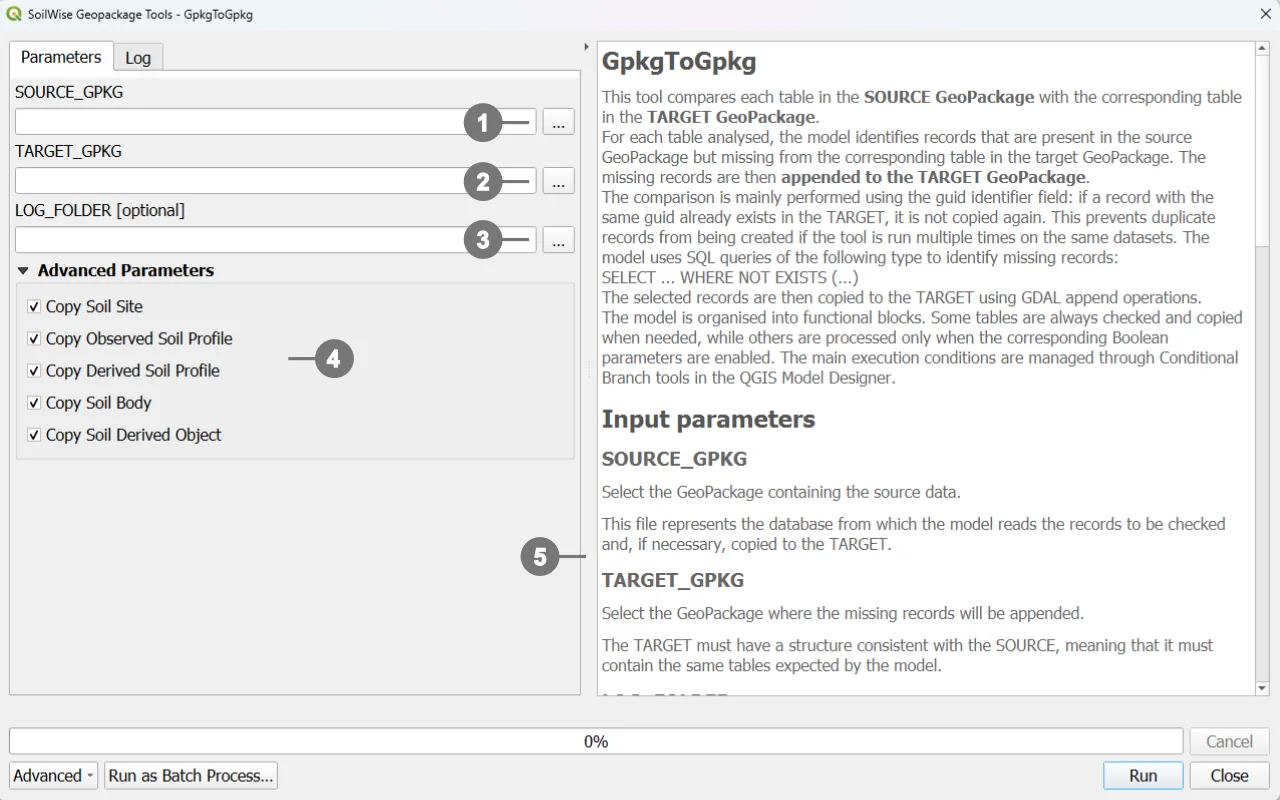 QGIS opens the model execution dialog. In this dialog, specify:
① The source GeoPackage.
② The target GeoPackage.
③ The optional log folder.
④ The data groups to be copied.
⑤ The right-hand side of the dialog also contains the model help panel. This panel provides a brief description of the tool and explains the purpose of the available parameters.
Click the RUN button to execute the model
Configuring the Parameters
Main Parameters
Source GeoPackage
The Source GeoPackage parameter identifies the source dataset.
This is the database from which the model reads the records that must be checked and, when necessary, copied.
The SOURCE:
- is accessed for reading;
- contains the data to be transferred;
- must include the tables expected by the model;
- is not modified by the append operations.
To set this parameter, select the source file with the .gpkg extension.
Target GeoPackage
The Target GeoPackage parameter identifies the destination dataset.
The model compares the SOURCE tables with the corresponding TARGET tables and appends only the records that are missing from the TARGET.
The TARGET must:
- exist before the model is run;
- have a structure consistent with the SOURCE;
- contain the tables required by the model;
- be writable;
- not be locked by another application.
If a record with the same key is already present in the TARGET, it is not copied again.
Warning
The model does not create a complete copy of the SOURCE file and does not automatically create the full TARGET schema. Its purpose is to append missing records to a target GeoPackage that has already been prepared.
Log Folder
The Log Folder parameter identifies the directory in which the execution log will be saved.
The log can be used to:
- verify the outcome of the processing operation;
- investigate errors;
- review which algorithms were executed;
- retain an audit trail of the operation;
- document processing runs involving large datasets.
If a valid folder is selected, the model saves the QGIS Processing log in that folder.
If the parameter is left empty:
- data transfer can still be performed;
- the log export workflow is not enabled;
- no log file is created in a user-selected folder.
Log export is controlled by the LOG conditional branch, which checks that the path is not null and is not an empty string.
Data Selection Parameters
The following parameters allow the transfer to be restricted to specific data groups.
They can be enabled individually or in combination. The selected combination determines which sections of the model are executed.
Copy Soil Site
The Copy Soil Site parameter controls the transfer of data related to Soil Sites.
When the parameter is enabled
The model copies:
- records from the
soilsitetable that are not already present in the TARGET; - datastreams associated with the selected Soil Sites;
- observations linked to those datastreams.
The workflow therefore includes the Soil Site entity and its associated observational data.
When the parameter is disabled
The model does not copy:
soilsiterecords;- datastreams linked to Soil Sites;
- observations associated with those datastreams.
Disabling this parameter does not prevent other selected data groups from being processed.
Copy Observed Soil Profile
The Copy Observed Soil Profile parameter controls the transfer of observed Soil Profiles.
Observed profiles are identified by the following condition:
isderived = 0
When the parameter is enabled
The model copies:
- missing observed Soil Profiles;
- associated Soil Plots;
- related Profile Elements;
- associated descriptive and classification tables;
- datastreams related to profiles and profile elements;
- observations linked to those datastreams;
- relationships with Soil Derived Objects, when Copy Soil Derived Object is also enabled.
When the parameter is disabled
Profiles where isderived = 0 are not appended to the TARGET.
Workflow sections that specifically depend on observed profiles, such as Soil Plots and some relationships with Soil Derived Objects, are also skipped.
Copy Derived Soil Profile
The Copy Derived Soil Profile parameter controls the transfer of derived Soil Profiles.
Derived profiles are identified by the following condition:
isderived = 1
When the parameter is enabled
The model copies:
- missing derived Soil Profiles;
- associated Profile Elements;
- related descriptive and classification tables;
- datastreams related to profiles and profile elements;
- linked observations;
- the relationship with Soil Bodies, when Copy Soil Body is also enabled.
When the parameter is disabled
Profiles where isderived = 1 are not appended to the TARGET.
Relationships that require derived profiles are also not copied.
Relationship Between Observed and Derived Profiles
When both of the following parameters are enabled:
- Copy Observed Soil Profile;
- Copy Derived Soil Profile;
the model also enables the transfer of the isderivedfrom table.
This table represents the relationship between a derived profile and the observed profile from which it was derived.
The relationship is copied only when both profile groups are selected. This prevents the TARGET from receiving a relationship that points to a profile that has not been included.
The possible combinations are therefore:
- observed profiles only:
isderivedfromis not copied; - derived profiles only:
isderivedfromis not copied; - observed and derived profiles: both groups and
isderivedfromare copied; - neither group selected: the Soil Profile workflow is not executed.
Copy Soil Body
The Copy Soil Body parameter controls the transfer of data related to Soil Bodies.
When the parameter is enabled
The model copies:
- records from the
soilbodytable; - geometries stored in
soilbody_geom; derivedprofilepresenceinsoilbody, when derived Soil Profiles are also enabled;isbasedonsoilbody, when Soil Derived Objects are also enabled.
When the parameter is disabled
The model does not copy:
- Soil Body records;
- their geometries;
- relationships that depend on the presence of Soil Bodies.
This parameter can be combined with Copy Derived Soil Profile and Copy Soil Derived Object to preserve relationships between the corresponding domains.
Copy Soil Derived Object
The Copy Soil Derived Object parameter controls the transfer of Soil Derived Objects.
When the parameter is enabled
The model copies:
- records from the
soilderivedobjecttable; - associated geometries;
- records from the
isbasedonsoilderivedobjectrelationship table; - datastreams linked to Soil Derived Objects;
- observations associated with those datastreams;
isbasedonobservedsoilprofile, when observed Soil Profiles are also enabled;isbasedonsoilbody, when Soil Bodies are also enabled.
When the parameter is disabled
The model does not copy:
- Soil Derived Objects;
- their related datastreams;
- linked observations;
- relationships that depend on the presence of Soil Derived Objects.
Selecting Parameter Combinations
The parameters can be used independently, but some combinations preserve a more complete set of relationships.
Soil Sites Only
Enable:
- Copy Soil Site
The model copies Soil Sites, related datastreams, and linked observations.
Observed Soil Profiles Only
Enable:
- Copy Observed Soil Profile
The model copies profiles where isderived = 0, Soil Plots, and the associated descriptive and observational data.
Derived Soil Profiles Only
Enable:
- Copy Derived Soil Profile
The model copies profiles where isderived = 1 and the related data.
Observed and Derived Soil Profiles
Enable:
- Copy Observed Soil Profile;
- Copy Derived Soil Profile.
The model copies both groups and the isderivedfrom relationship.
Soil Bodies and Derived Soil Profiles
Enable:
- Copy Soil Body;
- Copy Derived Soil Profile.
The model can also copy the derivedprofilepresenceinsoilbody relationship.
Soil Derived Objects and Observed Soil Profiles
Enable:
- Copy Soil Derived Object;
- Copy Observed Soil Profile.
The model can also copy the isbasedonobservedsoilprofile relationship.
Soil Derived Objects and Soil Bodies
Enable:
- Copy Soil Derived Object;
- Copy Soil Body.
The model can also copy the isbasedonsoilbody relationship.
Tip
To preserve all relationships between two domains, enable both relevant parameters. Otherwise, the model may omit the relationship table to avoid references to entities that are not present in the TARGET.
Note
Refer to the model’s technical documentation for a detailed explanation of its internal structure and workflow logic.